A successful website design process starts with your brand, then moves through goals, audience research, structure, content, design, build, testing and launch. For a B2B or corporate website, each step should help buyers understand what you do, trust you and get in touch. Following the steps in order avoids costly rework and gives you a site that supports the business long after launch.
This guide explains each step in plain terms. It is written for owners and senior managers of growth and mid-size companies in Singapore who are planning a new website or a redesign.
Why the Website Design Process Matters for B2B Companies
Your Website Is Often the First Meeting
Before a buyer calls you, they usually visit your website. They check what you offer, who you work with and whether you look credible. For many B2B companies, the website is the first real meeting with a prospect. If it is unclear or outdated, you may lose the opportunity before you know it existed. A strong website, on the other hand, does part of the selling for you. It answers common questions, shows proof and helps buyers arrive at the first meeting already interested.
A Clear Process Saves Time and Rework
Many website projects go wrong because design starts before decisions are made. Pages get redesigned again and again, content arrives late and the launch slips. A clear process puts decisions in the right order, so each step builds on the one before. It also makes the project easier to manage, because everyone knows what is expected at each stage and when.
Many People Need to Agree
Corporate websites involve leadership, marketing, sales, operations and often IT, as well as outside suppliers such as photographers and copywriters. Each group has different needs. A structured process gives everyone a clear role and clear points where they review and approve the work. Without it, feedback arrives late, opinions clash and the project loses direction.
Before You Start: Brand Comes First
A website is one of the most important brand touchpoints. It should express your brand, not invent it. If your brand is unclear, the website project will struggle.
Check Your Brand Positioning
Before you plan pages, make sure you can answer three questions. Who are your most important customers? What problem do you solve for them? Why should they choose you over others? These answers come from your brand positioning, and together they form your positioning statement. They shape the headline on your home page, the order of your services and the proof you show.
If the answers are not clear, consider a short brand audit or positioning exercise first. It is much easier to design a website on a solid brand foundation than to fix the strategy halfway through the build. In our approach to brand development, the website comes in the brand touchpoints stage, after the audit, positioning and identity are in place.
Know Your Identity and Tone of Voice
Your website should use your logo, colours, typography and imagery consistently. It should also sound like your brand. A clear tone of voice and brand personality help writers and designers make the right choices on every page. They decide whether the site feels formal or friendly, technical or simple, bold or calm. If your brand platform and guidelines are out of date, update them before the website design begins.
The Website Design Process: Step by Step
Step 1: Set Goals and Success Measures
Start by agreeing what the website must achieve. For a B2B company, goals often include generating qualified enquiries, supporting the sales team, explaining complex services, attracting talent and building credibility with partners.
Choose a few measures to track after launch, such as enquiries, time spent on key pages or downloads of important documents. Record where these measures stand today, so you can compare them after the new site goes live. Clear goals help you make decisions throughout the project and judge success afterwards. They should reflect your brand positioning and support your wider brand growth strategy, such as entering a new market or attracting larger clients.
Step 2: Research Your Audience
List the people who will use the website. In B2B, this often includes procurement managers, technical specialists, senior decision makers, existing clients and job seekers. Each group arrives with different questions, and the overall customer experience depends on how quickly each one finds answers.
Talk to customers and your sales team. Ask what buyers want to know before they make contact, which questions come up most often and what makes them hesitate. This research tells you what content matters most and how to organise it. It also reveals the words buyers use, which helps your content match what they search for and how they think.
Step 3: Review Competitors
Look at the websites of your main competitors. Note how they describe their services, what proof they show and how easy their sites are to use. Look for gaps you can fill and clichés you should avoid. If every competitor uses the same phrases and images, doing something different can help you stand out.
Compare their brand positioning with yours. Mapping competitors on a simple positioning framework, using two factors buyers care about, can show where you stand apart.
The aim is not to copy. It is to understand what buyers see when they compare you, so your website can make your brand differentiation clear and turn it into a competitive advantage.
Step 4: Plan the Sitemap and Structure
A sitemap shows every page and how they connect. Keep the structure simple, with clear labels that use your customers’ words rather than internal jargon. Buyers should be able to find what they need in a few clicks.
Group pages around what customers need, not around your internal departments, and order them to reflect your brand positioning. If your company has several divisions or product lines, decide how they appear on the site. A clear brand architecture makes it easy to see how each part relates to the whole.
Step 5: Develop the Content
Content is often the slowest part of a website project, so start early. Write clear headlines, short paragraphs and plain explanations of what you do. Lead with the customer’s problem and your solution, in line with your brand positioning, then add technical detail for readers who need it.
Your value proposition should appear clearly on the home page and in key service pages. Consistent brand messaging across the site helps buyers understand your offer quickly. Gather proof too: case studies, client logos, certifications and team profiles. Assign an owner for each page and agree deadlines, because waiting for content is one of the most common reasons websites launch late.
Content also supports search. Useful articles and insights, including thought leadership content, help buyers find you and show that you understand their challenges.
Step 6: Create Wireframes
Wireframes are simple layouts that show where content and features will sit on each page, without colours or images. They let you agree on structure and priorities before investing in visual design.
Review wireframes with the people who will use and manage the site. It is much easier to move a block on a wireframe than to change a finished design. Clickable wireframes or simple prototypes can also help you test the flow with a few real users before design begins.
Step 7: Design the Visual Interface
Now the brand comes to life. Designers apply your identity to the wireframes, creating page designs for desktop and mobile. Good user interface (UI) design makes the site feel like your brand and express its brand positioning, while keeping it easy to use.
Focus on clarity. Use strong headings, enough white space and clear calls to action. Images should show your real work, people and products where possible. Stock photos rarely help a B2B company stand out, because buyers have seen the same images many times. Learn more about our approach to UI/UX design.
Step 8: Build and Integrate
Developers turn the designs into a working website. This step includes setting up the content management system, so your team can update pages without technical help. It may also include connecting forms to your customer database, adding analytics and linking to other tools you use. Security matters too, especially if the site collects personal information through forms.
Choose a platform your team can manage. A website that only a developer can update quickly becomes out of date. Ask for training and simple guidance, so your team feels confident adding news, case studies and new pages.
Step 9: Test Everything
Before launch, test the site thoroughly. Check every page on different devices and browsers. Test forms, links and downloads. Read all the content again for errors. Ask people outside the project to try common tasks, such as finding a service or sending an enquiry, and watch where they struggle.
Also check basic search settings, page titles and descriptions, and loading speed. A slow or broken site damages trust. It is better to delay the launch by a short time than to go live with obvious problems.
Step 10: Launch
Plan the launch carefully. Set up redirects from old pages to new ones, so visitors and search engines do not hit broken links. Choose a launch date that avoids your busiest periods. Brief your team, especially sales and customer service, so they can guide customers to the new site. Keep a short list of checks to run in the first days after launch, such as forms, redirects and analytics.
Announce the launch to clients, partners and your network, and explain briefly what has changed and why. A new website is a good reason to get back in touch, and sharing it on LinkedIn and in newsletters helps build brand awareness among new audiences.
Step 11: Measure and Improve
Launch is not the end. Track the measures you set in Step 1 and watch how visitors use the site. Look at which pages attract attention, where people leave and which content leads to enquiries. Feedback from your sales team adds useful context, because they hear what prospects say after visiting the site.
Use what you learn to improve the site over time. Regular updates keep content fresh and show visitors that the company is active. Website data is also one useful signal of brand performance. Helpful resources for existing clients, such as guides or support pages, can strengthen brand loyalty too.
What Makes a B2B Website Different
Several Decision Makers
A B2B purchase often involves a group of people. An engineer may check technical details, a procurement manager may compare suppliers and a director may look at the overall fit. Your website needs to serve each of them, with clear paths to the information they care about. Downloadable documents, such as capability statements or technical sheets, help buyers share information inside their organisation.
Longer Journeys
B2B buyers rarely decide on their first visit. They may return several times over weeks or months, often after meeting your team. The website should support each stage, from first impressions to detailed evaluation, and make it easy to take the next step when they are ready. Regular articles and updates give buyers a reason to return between visits.
Proof and Trust
Because the stakes are high, B2B buyers look for proof. Case studies, client lists, certifications, team profiles and clear explanations of your process all help. Generic claims such as “quality solutions” add little. Specific evidence builds trust and supports brand recognition among the buyers you want to reach.
Key Pages for a B2B or Corporate Website
Home Page
The home page should answer three questions within seconds: what you do, who you do it for and why you are the right choice. Lead with a clear headline based on your brand positioning, followed by your main services and strong proof.
About Page
Buyers want to know who they are dealing with. Share your story, values, leadership team and experience. Real photos of your people and workplace make the company feel more approachable. A clear brand narrative helps buyers understand where the company comes from and where it is going.
Services or Solutions Pages
Give each main service its own page. Explain the problem it solves, the customer value it creates, how you work and what customers receive. Use plain language first and technical detail second. Link to relevant case studies on each page.
Case Studies
Case studies show your work in action. Explain the client’s challenge, your approach and how the work was applied. Organise them by sector or service so buyers can find relevant examples quickly. Short summaries at the top of each case study help busy readers grasp the main points.
Contact and Enquiry Pages
Make it easy to get in touch. Offer more than one way to reach you, such as a form, an email address and a phone number. Keep forms short, show your office locations and explain what happens after someone sends an enquiry. Every key page should include a clear way to contact you.
Design Principles for Corporate Websites
Clarity Over Decoration
Every design choice should help visitors understand your offer and your brand positioning. Remove anything that distracts, such as unnecessary animations or crowded layouts. A clear site feels more confident than a busy one. Give each page one main purpose and one main action you want visitors to take.
Consistency With the Brand
The website should match your other materials, from brochures to presentations. Consistency builds trust and strengthens brand equity, because every touchpoint reinforces the same impression.
Mobile and Accessibility
Many buyers browse on their phones, even for business decisions, often while travelling or between meetings. Design for mobile from the start. Make the site accessible too, with readable text, good colour contrast and clear navigation for all users. Accessible design helps everyone, not only people with specific needs.
Speed and Search
A fast website keeps visitors engaged. Good structure, clear headings and useful content also help search engines understand your site, which improves brand visibility when buyers search for what you offer.
Examples From Our Work
We have designed websites and digital experiences for clients across different sectors, including the three below.
PacificLight (Website and UI/UX Design)
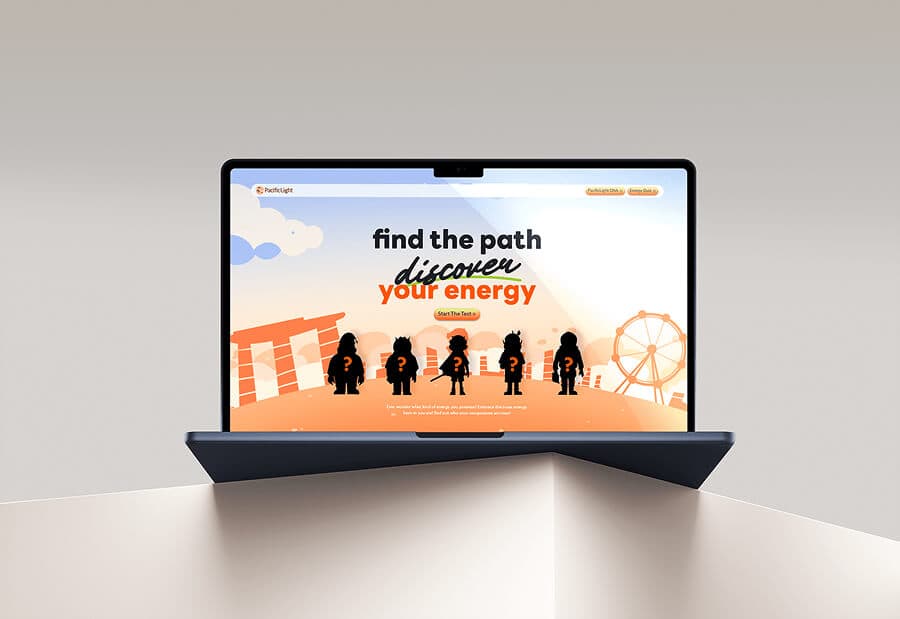
PacificLight is a Singapore energy company that wanted a digital way to mark its 10th anniversary and share its sustainability and community work. We built an interactive microsite with scroll-based storytelling, bespoke illustrated characters and a personalised quiz, balancing corporate professionalism with warmth.
See the PacificLight case study.
Four Star (Bedding and Furniture)
Four Star is a Singapore mattress and bedding brand founded in 1976, whose image had come to feel dated to modern audiences. As part of a full rebrand, we redesigned its logotype and colours and carried the new identity across its showroom, packaging, social media and website.
See the Four Star case study.
WYLTH (Wealth Management)
WYLTH is a multi-asset technology platform for independent financial advisers, whose old website made it hard for users to find what it offers. We redesigned the website with a clearer structure and information layout, alongside a new identity applied to its platform interface and digital ads.
See the WYLTH case study.
Redesigning an Existing Website
Many companies are not starting from scratch. They have a website that no longer reflects the business, looks dated or is hard to manage. A redesign follows the same steps, with a few extra points to consider.
First, review what already works. Look at which pages attract the most visitors and enquiries, and which content customers find useful. Keep and improve these rather than throwing them away.
Second, plan your redirects carefully. Old pages may have links from other websites and positions in search results. Pointing each old address to the right new page protects that value.
Third, check whether the brand itself needs attention. If your company has recently gone through a brand refresh, the website should reflect the new identity in full. If the brand positioning has not been reviewed for years, it may be worth doing that first, so the new website is built on a current strategy.
Choosing a Website Design Partner
The right partner understands both your brand and the technical side of building a website. Ask how they connect brand strategy to website structure and content, who will manage the project and how they handle testing and launch.
Look at their past work, especially for companies with similar audiences. Ask how they involve your team, how many review points there are and what support they offer after launch. For companies aiming for market leadership in their sector, the website is often the clearest public expression of that ambition, so it is worth choosing a partner who can carry the brand through every page.
Common Website Design Mistakes to Avoid
Designing Before the Content Is Ready
When design starts without content, pages are built around placeholder text. Real content rarely fits, so layouts must be redesigned. Plan content early and design around it. Even rough draft text is better than placeholder text, because it shows the real length and tone of each page.
Talking About Yourself Instead of the Customer
Many corporate websites list company history, values and awards before explaining what they do for customers. Lead with the customer’s needs, then show how your company meets them. History and values still matter, but they work best as supporting evidence.
Forgetting About Life After Launch
A website needs regular care. Without updates, content becomes outdated and the site loses its value. Plan who will own the website, how often it will be updated and how it will support your wider marketing.
About Creativeans
Creativeans is a brand strategy and design consultancy with teams in Singapore, Milan and Jakarta. Since 2012, we have built 300+ brands. We start with research, then design the identity and every touchpoint, through to brand rollout. Our method is BrandBuilder®, in five stages: brand audit, brand positioning, brand identity, brand touchpoints and brand rollout. Our co-founders are Kimming Yap, a Registered Management Consultant (RMC), and Yulia Saksen, a Certified Management Consultant (CMC).
Frequently Asked Questions
Where should a website design project start?
It should start with your brand and your goals. Make sure your brand positioning is clear, then agree what the website must achieve and who it is for.
How much does a website cost in Singapore?
It depends on the size of the site, the amount of custom design and the features you need. Our web design pricing guide explains the main factors.
Who should be involved in a website project?
Leadership sets the goals. Marketing and sales help shape content and messages. Operations and IT advise on practical needs. One person should own the project and coordinate decisions.
What is the difference between UI and UX design?
UX design focuses on how easy and pleasant the site is to use, such as structure and navigation. UI design focuses on how it looks, including layout, colour and typography. A good website needs both.
How do we keep the website effective after launch?
Track enquiries and visitor behaviour, update content regularly and review the site against your goals. Small, frequent improvements keep the website useful, and help it grow alongside the business.
Next Step
Contact Creativeans to discuss your brand.




 INSIGHTS